จุดเริ่มต้น
ทุกอย่างเริ่มจากการดู YouTube ของ devaslife ที่เขา code อยู่บน Neovim มันดูสวยและ smooth มากจนอยากลองบ้าง เลยไปหาข้อมูลต่อจนได้มารู้จักกับ LazyVim และตัดสินใจย้ายมาใช้ตั้งแต่นั้น
Neovim คือ text editor ที่รันอยู่ใน terminal ต่อยอดมาจาก Vim สิ่งที่ทำให้มันน่าสนใจคือเร็วมาก, config ได้ทุกอย่าง และมี plugin ecosystem ที่ดีมากๆ
การย้ายจาก VSCode หรือ IDE อื่นมาใช้ Neovim ไม่ได้ยากเลย แต่สิ่งที่ต้องใช้เวลาจริงๆ คือการฝึกใช้ Vim ให้ชินมือ ไม่ว่าจะเป็นการเข้าใจว่าแต่ละ mode ทำอะไร, การใช้ h j k l เคลื่อน cursor แทน Arrow Key, หรือแม้แต่คำสั่งพื้นฐานอย่างการ save (:w) และออกจาก Neovim (:q) สิ่งเหล่านี้ต้องฝึกจนเป็นอัตโนมัติก่อน
| Mode | หน้าที่ |
|---|---|
| Normal | mode หลัก เลื่อน cursor และสั่งงานต่างๆ |
| Insert | พิมพ์ข้อความ เหมือน editor ทั่วไป |
| Visual | select ข้อความ คล้ายกับการ drag mouse |
ต้องใช้เวลาทำให้มันชินมือสักพักหนึ่ง แต่พอชินแล้วมือแทบไม่ต้องออกจาก keyboard เลย
เลือก Distribution
ก่อนลง plugin มีเรื่องสำคัญที่ต้องตัดสินใจก่อน นั่นคือจะใช้ Neovim ในแบบไหน
- Neovim ตรงๆ — config ทุกอย่างเองตั้งแต่ศูนย์ ยืดหยุ่นสูงสุดแต่ต้องลงแรงเยอะ
- Distribution — config สำเร็จรูปที่คนอื่นทำมาให้ เริ่มได้เร็ว มี plugin พื้นฐานพร้อมแล้ว
สำหรับคนที่เพิ่งเริ่ม แนะนำให้ไปทาง Distribution ก่อน เพราะไม่ต้องเสียเวลา setup ตั้งแต่ต้น ตัวที่นิยมมีสองตัว
| Distribution | จุดเด่น |
|---|---|
| LazyVim | เริ่มได้เร็ว, customize ได้เยอะ, community ใหญ่, document ละเอียด |
| NvChad | UI สวย, เร็ว, config ผ่าน Lua module |
ผมเลือก LazyVim เพราะ community ใหญ่ document เยอะและเข้าใจง่าย หาคำตอบได้ง่ายมากเวลาติดปัญหา
ติดตั้ง Neovim
ผมใช้ macOS ดังนั้นจะแนะนำแนวทางของ macOS เป็นหลัก สำหรับ Linux หรือ Windows ดูได้ที่ Neovim Installation Guide
วิธีที่ง่ายที่สุดคือใช้ Homebrew
| 1 | brew install neovim |
เช็คว่าติดตั้งสำเร็จ
| 1 | nvim --version |
| 2 | |
| 3 | # ถ้าแสดง version ของ Nvim แบบนี้คือติดตั้งแล้ว |
| 4 | # NVIM v0.11.4 |
| 5 | # Build type: Release |
| 6 | # LuaJIT 2.1.1753364724 |
| 7 | # Run "nvim -V1 -v" for more info |
หลักจาก ติดตั้ง Neovim เสร็จเราจะมาติดตั้ง LazyVim ต่อ
ติดตั้ง LazyVim
LazyVim ทำงานโดย clone config ลงที่ ~/.config/nvim ก่อนอื่น backup config เดิมไว้ก่อน (ถ้ามี)
| 1 | #เปลี่ยนชื่อจาก nvim เป็น nvim.bak เพื่อเก็บไว้เป็น backup |
| 2 | mv ~/.config/nvim ~/.config/nvim.bak |
| 3 | #อันนี้ก็เหมือนกันเป็นพวก cache ของ nvim |
| 4 | mv ~/.local/share/nvim ~/.local/share/nvim.bak |
แล้ว clone LazyVim starter
| 1 | #จะ clone lazyvim มาแทนที่ nvim ที่เรา backup ไว้ |
| 2 | git clone https://github.com/LazyVim/starter ~/.config/nvim |
| 3 | #ลบ git ของต้นออก |
| 4 | rm -rf ~/.config/nvim/.git |
จากนั้นเปิด Neovim
| 1 | nvim |
ครั้งแรกมันจะ install plugin ทั้งหมดให้อัตโนมัติ รอสักครู่แล้วก็พร้อมใช้งาน
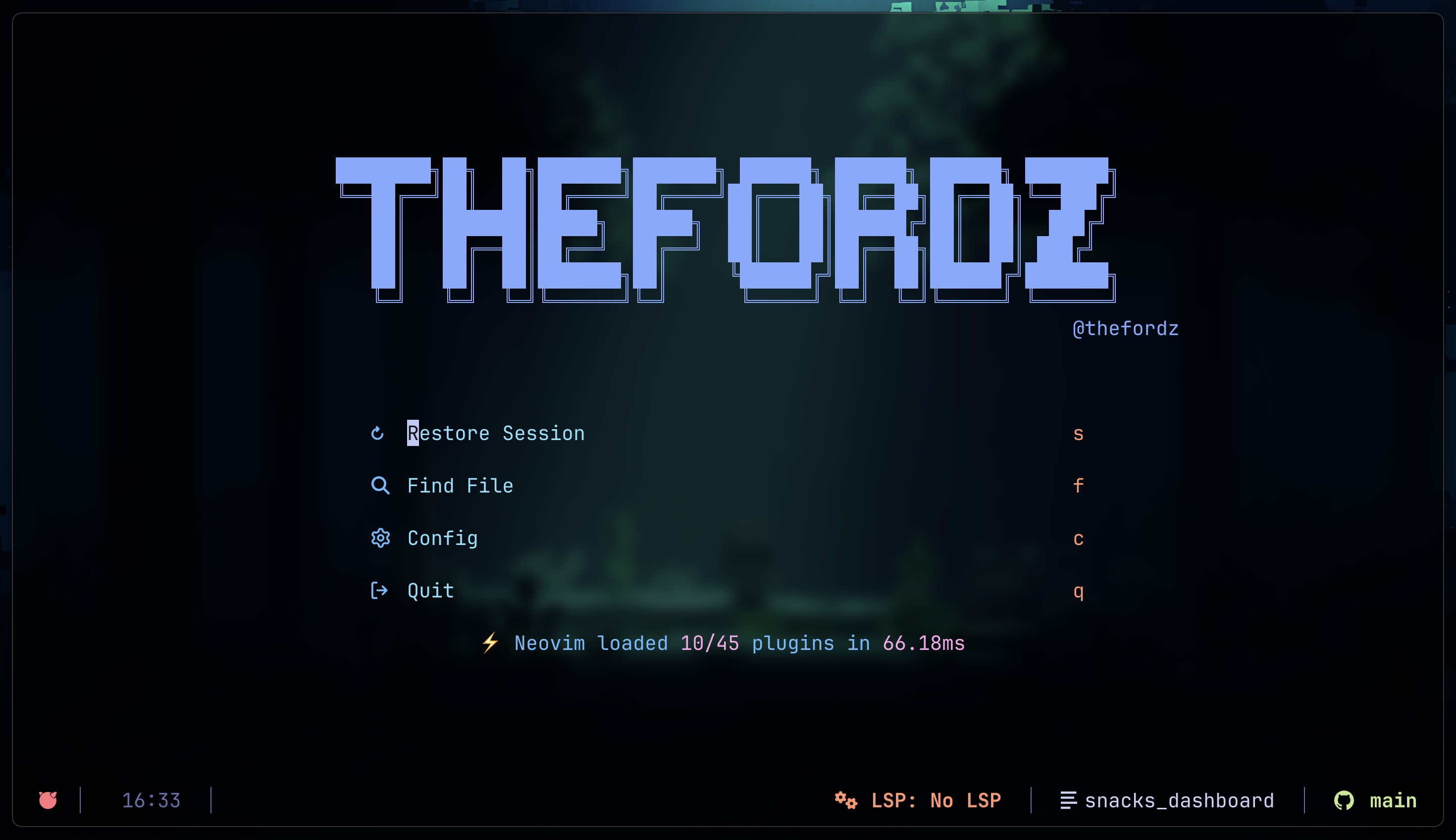
เมื่อพร้อมใช้งานจะแสดงหน้าแบบนี้
Plugins ที่ใช้
Blink.lua
saghen/blink.cmp เป็น autocomplete engine ตัวใหม่ที่เขียนด้วย Rust ทำให้เร็วกว่า nvim-cmp มาก ผมใช้แทน nvim-cmp เลย รองรับ ghost text, completion menu แบบ rounded border และ documentation popup อัตโนมัติ
| 1 | return { |
| 2 | { "hrsh7th/nvim-cmp", enabled = false }, |
| 3 | { |
| 4 | "saghen/blink.cmp", |
| 5 | opts = { |
| 6 | keymap = { |
| 7 | preset = "default", |
| 8 | ["<CR>"] = { "accept", "fallback" }, |
| 9 | ["<Tab>"] = { "select_next", "fallback" }, |
| 10 | ["<S-Tab>"] = { "select_prev", "fallback" }, |
| 11 | }, |
| 12 | appearance = { use_nvim_cmp_as_default = true }, |
| 13 | sources = { default = { "lsp", "path", "snippets", "buffer" } }, |
| 14 | completion = { |
| 15 | menu = { |
| 16 | border = "rounded", |
| 17 | |
| 18 | winblend = 0, |
| 19 | min_width = 62, |
| 20 | max_width = 62, |
| 21 | offset = 2, |
| 22 | scrolloff = 3, |
| 23 | }, |
| 24 | documentation = { |
| 25 | auto_show = true, |
| 26 | auto_show_delay_ms = 500, |
| 27 | window = { |
| 28 | border = "rounded", |
| 29 | winblend = 0, |
| 30 | max_width = 60, |
| 31 | max_height = 20, |
| 32 | min_width = 40, |
| 33 | direction_priority = { |
| 34 | menu_north = { "n", "e", "w", "s" }, -- แสดงบนก่อน |
| 35 | menu_south = { "n", "e", "w", "s" }, -- แสดงบนก่อน |
| 36 | }, |
| 37 | }, |
| 38 | }, |
| 39 | ghost_text = { |
| 40 | enabled = true, |
| 41 | }, |
| 42 | }, |
| 43 | }, |
| 44 | }, |
| 45 | } |
ColorSchema.lua
นี้คือ color theme ของ LazyVim
เมื่อก่อนผมใช้ catppuccin แต่เดียวนี้เปลี่ยนมาใช้ tokyo-night
แนะนำ สำหรับใครชอบแนว pastel ใช้ catppuccin ถ้าชอบสไตล์ดูออกอก neon หน่อย ก็ tokyo night เลย
| 1 | return { |
| 2 | |
| 3 | { |
| 4 | "LazyVim/LazyVim", |
| 5 | opts = { |
| 6 | colorscheme = "tokyonight", |
| 7 | }, |
| 8 | }, |
| 9 | { |
| 10 | "folke/tokyonight.nvim", |
| 11 | lazy = true, |
| 12 | opts = { |
| 13 | style = "moon", |
| 14 | transparent = true, |
| 15 | styles = { |
| 16 | sidebars = "transparent", |
| 17 | floats = "transparent", |
| 18 | }, |
| 19 | on_highlights = function(hl, c) |
| 20 | hl.StatusLine = { bg = "NONE", fg = c.fg } |
| 21 | hl.StatusLineNC = { bg = "NONE", fg = c.fg } |
| 22 | hl.lualine_c_normal = { bg = "NONE", fg = c.fg } |
| 23 | hl.lualine_c_insert = { bg = "NONE", fg = c.fg } |
| 24 | hl.lualine_c_visual = { bg = "NONE", fg = c.fg } |
| 25 | hl.lualine_c_replace = { bg = "NONE", fg = c.fg } |
| 26 | hl.lualine_c_command = { bg = "NONE", fg = c.fg } |
| 27 | hl.lualine_c_inactive = { bg = "NONE", fg = c.fg } |
| 28 | hl.lualine_x_normal = { bg = "NONE", fg = c.fg } |
| 29 | hl.lualine_x_insert = { bg = "NONE", fg = c.fg } |
| 30 | hl.lualine_x_visual = { bg = "NONE", fg = c.fg } |
| 31 | hl.lualine_x_replace = { bg = "NONE", fg = c.fg } |
| 32 | hl.lualine_x_command = { bg = "NONE", fg = c.fg } |
| 33 | hl.lualine_x_inactive = { bg = "NONE", fg = c.fg } |
| 34 | end, |
| 35 | }, |
| 36 | }, |
| 37 | |
| 38 | { |
| 39 | "catppuccin/nvim", |
| 40 | lazy = true, |
| 41 | name = "catppuccin", |
| 42 | priority = 1000, |
| 43 | opts = { |
| 44 | lsp_styles = { |
| 45 | underlines = { |
| 46 | errors = { "undercurl" }, |
| 47 | hints = { "undercurl" }, |
| 48 | warnings = { "undercurl" }, |
| 49 | information = { "undercurl" }, |
| 50 | }, |
| 51 | }, |
| 52 | flavour = "mocha", -- latte, frappe, macchiato, mocha |
| 53 | transparent_background = true, |
| 54 | integrations = { |
| 55 | aerial = true, |
| 56 | alpha = true, |
| 57 | cmp = true, |
| 58 | dashboard = true, |
| 59 | flash = true, |
| 60 | fzf = true, |
| 61 | grug_far = true, |
| 62 | gitsigns = true, |
| 63 | headlines = true, |
| 64 | illuminate = true, |
| 65 | indent_blankline = { enabled = true }, |
| 66 | leap = true, |
| 67 | lsp_trouble = true, |
| 68 | mason = true, |
| 69 | mini = true, |
| 70 | navic = { enabled = true, custom_bg = "lualine" }, |
| 71 | neotest = true, |
| 72 | neotree = true, |
| 73 | noice = true, |
| 74 | notify = true, |
| 75 | snacks = true, |
| 76 | telescope = true, |
| 77 | treesitter_context = true, |
| 78 | which_key = true, |
| 79 | }, |
| 80 | }, |
| 81 | }, |
| 82 | specs = { |
| 83 | { |
| 84 | "akinsho/bufferline.nvim", |
| 85 | optional = true, |
| 86 | opts = function(_, opts) |
| 87 | if (vim.g.colors_name or ""):find("catppuccin") then |
| 88 | opts.highlights = require("catppuccin.special.bufferline").get_theme() |
| 89 | end |
| 90 | end, |
| 91 | }, |
| 92 | }, |
| 93 | } |
Conform.lua
stevearc/conform.nvim จัดการ format code อัตโนมัติเมื่อ save ผมใช้ prettier เป็น formatter หลักสำหรับ web stack ทั้งหมด ไม่ว่าจะเป็น TypeScript, Astro, CSS, HTML, JSON
| 1 | |
| 2 | return { |
| 3 | { |
| 4 | "stevearc/conform.nvim", |
| 5 | opts = { |
| 6 | formatters_by_ft = { |
| 7 | astro = { "prettier" }, |
| 8 | typescript = { "prettier" }, |
| 9 | tsx = { "prettier" }, |
| 10 | javascript = { "prettier" }, |
| 11 | jsx = { "prettier" }, |
| 12 | css = { "prettier" }, |
| 13 | html = { "prettier" }, |
| 14 | json = { "prettier" }, |
| 15 | }, |
| 16 | }, |
| 17 | }, |
| 18 | } |
Dashboard.lua
หน้า start screen เมื่อเปิด Neovim ผม custom ASCII art header เป็นชื่อตัวเอง พร้อม shortcut keys สำหรับ restore session, find file, เปิด config และออกจาก editor
| 1 | |
| 2 | return { |
| 3 | { |
| 4 | "folke/snacks.nvim", |
| 5 | opts = function(_, opts) |
| 6 | opts.dashboard = vim.tbl_deep_extend("force", opts.dashboard or {}, { |
| 7 | row = nil, |
| 8 | col = nil, |
| 9 | pane_gap = 4, |
| 10 | autokeys = "1234567890abcdefghijklmnopqrstuvwxyzABCDEFGHIJKLMNOPQRSTUVWXYZ", |
| 11 | preset = { |
| 12 | pick = nil, |
| 13 | header = [[ |
| 14 | ████████╗██╗ ██╗███████╗███████╗ ██████╗ ██████╗ ██████╗ ███████╗ |
| 15 | ╚══██╔══╝██║ ██║██╔════╝██╔════╝██╔═══██╗██╔══██╗██╔══██╗╚══███╔╝ |
| 16 | ██║ ███████║█████╗ █████╗ ██║ ██║██████╔╝██║ ██║ ███╔╝ |
| 17 | ██║ ██╔══██║██╔══╝ ██╔══╝ ██║ ██║██╔══██╗██║ ██║ ███╔╝ |
| 18 | ██║ ██║ ██║███████╗██║ ╚██████╔╝██║ ██║██████╔╝███████╗ |
| 19 | ╚═╝ ╚═╝ ╚═╝╚══════╝╚═╝ ╚═════╝ ╚═╝ ╚═╝╚═════╝ ╚══════╝ |
| 20 | @thefordz |
| 21 | ]], |
| 22 | keys = { |
| 23 | |
| 24 | { icon = " ", key = "s", desc = "Restore Session", section = "session" }, |
| 25 | { icon = " ", key = "f", desc = "Find File", action = ":lua Snacks.dashboard.pick('files')" }, |
| 26 | -- { icon = " ", key = "r", desc = "Recent", action = ":lua Snacks.dashboard.pick('oldfiles')" }, |
| 27 | { |
| 28 | icon = " ", |
| 29 | key = "c", |
| 30 | desc = "Config", |
| 31 | action = ":lua Snacks.dashboard.pick('files', {cwd = vim.fn.stdpath('config')})", |
| 32 | }, |
| 33 | |
| 34 | { icon = " ", key = "q", desc = "Quit", action = ":qa" }, |
| 35 | |
| 36 | -- { icon = " ", key = "n", desc = "New File", action = ":ene | startinsert" }, |
| 37 | -- { icon = " ", key = "g", desc = "Find Text", action = ":lua Snacks.dashboard.pick('live_grep')" }, |
| 38 | -- { icon = " ", key = "L", desc = "Lazy", action = ":Lazy", enabled = package.loaded.lazy ~= nil }, |
| 39 | }, |
| 40 | }, |
| 41 | formats = { |
| 42 | icon = function(item) |
| 43 | if (item.file and item.icon == "file") or item.icon == "directory" then |
| 44 | return M.icon(item.file, item.icon) |
| 45 | end |
| 46 | return { item.icon, width = 2, hl = "icon" } |
| 47 | end, |
| 48 | footer = { "%s", align = "center" }, |
| 49 | header = { "%s", align = "center" }, |
| 50 | file = function(item, ctx) |
| 51 | local fname = vim.fn.fnamemodify(item.file, ":~") |
| 52 | fname = ctx.width and #fname > ctx.width and vim.fn.pathshorten(fname) or fname |
| 53 | if #fname > ctx.width then |
| 54 | local dir = vim.fn.fnamemodify(fname, ":h") |
| 55 | local file = vim.fn.fnamemodify(fname, ":t") |
| 56 | if dir and file then |
| 57 | file = file:sub(-(ctx.width - #dir - 2)) |
| 58 | fname = dir .. "/…" .. file |
| 59 | end |
| 60 | end |
| 61 | local dir, file = fname:match("^(.*)/(.+)$") |
| 62 | return dir and { { dir .. "/", hl = "dir" }, { file, hl = "file" } } or { { fname, hl = "file" } } |
| 63 | end, |
| 64 | }, |
| 65 | sections = { |
| 66 | { section = "header" }, |
| 67 | { section = "keys", gap = 1, padding = 1 }, |
| 68 | { section = "startup" }, |
| 69 | }, |
| 70 | }) |
| 71 | end, |
| 72 | }, |
| 73 | } |
Explorer.lua
ใช้ snacks.nvim picker เป็น file explorer แบบ float window แทน neo-tree ข้อดีคือเปิดปิดได้เร็ว แสดง git status ในไฟล์ และ config layout ได้ยืดหยุ่น
| 1 | |
| 2 | return { |
| 3 | { |
| 4 | "folke/snacks.nvim", |
| 5 | opts = function(_, opts) |
| 6 | opts.picker = opts.picker or {} |
| 7 | opts.picker.enabled = true |
| 8 | opts.picker.sources = opts.picker.sources or {} |
| 9 | |
| 10 | opts.picker.sources.explorer = vim.tbl_deep_extend("force", opts.picker.sources.explorer or {}, { |
| 11 | hidden = false, |
| 12 | ignored = false, |
| 13 | git_status = true, -- ปิด git coloring |
| 14 | git_untracked = true, -- ไม่แสดง untracked indicator |
| 15 | layout = { layout = { position = "float", box = "vertical", border = "rounded", height = 0.9, width = 0.9 } }, |
| 16 | auto_close = true, |
| 17 | }) |
| 18 | |
| 19 | opts.picker.sources.files = |
| 20 | vim.tbl_deep_extend("force", opts.picker.sources.files or {}, { hidden = true, ignored = false }) |
| 21 | opts.picker.sources.grep = |
| 22 | vim.tbl_deep_extend("force", opts.picker.sources.grep or {}, { hidden = true, ignored = false }) |
| 23 | end, |
| 24 | }, |
| 25 | } |
Git.lua
รวม git tools ไว้ในไฟล์เดียว ประกอบด้วย diffview สำหรับดู diff และ file history, git-conflict สำหรับจัดการ merge conflict และ gitsigns สำหรับแสดง git changes inline ในแต่ละบรรทัดพร้อม blame
| 1 | |
| 2 | return { |
| 3 | -- diff viewer |
| 4 | { |
| 5 | "sindrets/diffview.nvim", |
| 6 | cmd = { "DiffviewOpen", "DiffviewFileHistory" }, |
| 7 | keys = { |
| 8 | { "<leader>gd", "<cmd>DiffviewOpen<cr>", desc = "Diff View" }, |
| 9 | { "<leader>gh", "<cmd>DiffviewFileHistory %<cr>", desc = "File History" }, |
| 10 | }, |
| 11 | opts = {}, |
| 12 | }, |
| 13 | |
| 14 | -- merge conflict |
| 15 | { |
| 16 | "akinsho/git-conflict.nvim", |
| 17 | event = "BufReadPre", |
| 18 | opts = {}, |
| 19 | }, |
| 20 | |
| 21 | --git signs |
| 22 | { |
| 23 | "lewis6991/gitsigns.nvim", |
| 24 | opts = { |
| 25 | signs = { |
| 26 | add = { text = "▎" }, -- เส้นซ้ายสีเขียว = เพิ่ม |
| 27 | change = { text = "▎" }, -- เส้นซ้ายสีเหลือง = แก้ |
| 28 | delete = { text = "" }, -- สัญลักษณ์สีแดง = ลบ |
| 29 | topdelete = { text = "‾" }, |
| 30 | changedelete = { text = "~" }, |
| 31 | }, |
| 32 | current_line_blame = true, -- แสดง blame inline |
| 33 | current_line_blame_opts = { |
| 34 | delay = 500, -- หน่วงก่อนแสดง |
| 35 | }, |
| 36 | }, |
| 37 | keys = { |
| 38 | -- นำทาง |
| 39 | { "]h", "<cmd>Gitsigns next_hunk<cr>", desc = "Next Hunk" }, |
| 40 | { "[h", "<cmd>Gitsigns prev_hunk<cr>", desc = "Prev Hunk" }, |
| 41 | |
| 42 | -- ดู diff |
| 43 | { "<leader>gd", "<cmd>Gitsigns diffthis<cr>", desc = "Diff This" }, |
| 44 | { "<leader>gD", "<cmd>Gitsigns diffthis HEAD~1<cr>", desc = "Diff Prev Commit" }, |
| 45 | |
| 46 | -- blame |
| 47 | { "<leader>gb", "<cmd>Gitsigns blame_line<cr>", desc = "Blame Line" }, |
| 48 | { "<leader>gB", "<cmd>Gitsigns toggle_current_line_blame<cr>", desc = "Toggle Blame" }, |
| 49 | |
| 50 | -- stage/reset |
| 51 | { "<leader>gs", "<cmd>Gitsigns stage_hunk<cr>", desc = "Stage Hunk" }, |
| 52 | { "<leader>gr", "<cmd>Gitsigns reset_hunk<cr>", desc = "Reset Hunk" }, |
| 53 | }, |
| 54 | }, |
| 55 | } |
LSP.lua
ตั้งค่า LSP servers สำหรับภาษาที่ใช้งานประจำ ทั้ง TypeScript, Tailwind, ESLint, CSS, HTML, JSON และ Prisma ใช้ nvim-lspconfig เป็นตัวกลางเชื่อม LSP กับ Neovim และมี symbols-outline สำหรับดู code structure ด้านขวา
| 1 | |
| 2 | return { |
| 3 | -- LSP servers |
| 4 | { |
| 5 | "neovim/nvim-lspconfig", |
| 6 | opts = { |
| 7 | servers = { |
| 8 | ts_ls = {}, -- TypeScript / JavaScript |
| 9 | tailwindcss = {}, -- Tailwind CSS |
| 10 | eslint = {}, -- ESLint |
| 11 | jsonls = {}, -- JSON |
| 12 | cssls = {}, -- CSS |
| 13 | html = {}, -- HTML |
| 14 | prismals = {}, -- Prisma |
| 15 | astro = {}, -- Adtro |
| 16 | }, |
| 17 | }, |
| 18 | }, |
| 19 | |
| 20 | { |
| 21 | -- add symbols-outline |
| 22 | { |
| 23 | "simrat39/symbols-outline.nvim", |
| 24 | cmd = "SymbolsOutline", |
| 25 | keys = { { "<leader>cs", "<cmd>SymbolsOutline<cr>", desc = "Symbols Outline" } }, |
| 26 | opts = { |
| 27 | -- add your options that should be passed to the setup() function here |
| 28 | position = "right", |
| 29 | }, |
| 30 | }, |
| 31 | }, |
| 32 | } |
Lualine.lua
status bar ด้านล่างของ editor แสดง mode ปัจจุบัน (พร้อมสีบอก normal/insert/visual), filename, diagnostics, LSP ที่ active, git branch และ diff ผม custom ทุกอย่างเองให้ match กับ tokyonight-moon แบบ transparent
| 1 | |
| 2 | return { |
| 3 | "nvim-lualine/lualine.nvim", |
| 4 | config = function() |
| 5 | local lualine = require("lualine") |
| 6 | local tokyo = require("tokyonight.colors").setup({ style = "moon" }) |
| 7 | |
| 8 | -- ตั้งชื่อสีตามความหมาย ไม่ใช่ชื่อสี |
| 9 | local colors = { |
| 10 | fg = tokyo.fg, -- text ทั่วไป |
| 11 | muted = tokyo.comment, -- text จาง เช่น separator |
| 12 | primary = tokyo.blue, -- element หลัก เช่น filename |
| 13 | success = tokyo.green, -- สถานะดี เช่น git branch, insert mode |
| 14 | warning = tokyo.yellow, -- เตือน เช่น warn diagnostic |
| 15 | danger = tokyo.red, -- error, normal mode |
| 16 | accent = tokyo.cyan, -- highlight พิเศษ เช่น filetype |
| 17 | info = tokyo.blue1 or tokyo.blue, -- info diagnostic |
| 18 | modified = tokyo.orange, -- แก้ไข เช่น git diff modified, LSP |
| 19 | visual = tokyo.purple, -- visual mode |
| 20 | command = tokyo.magenta, -- command mode |
| 21 | } |
| 22 | |
| 23 | local conditions = { |
| 24 | buffer_not_empty = function() |
| 25 | return vim.fn.empty(vim.fn.expand("%:t")) ~= 1 |
| 26 | end, |
| 27 | hide_in_width = function() |
| 28 | return vim.fn.winwidth(0) > 80 |
| 29 | end, |
| 30 | } |
| 31 | |
| 32 | local config = { |
| 33 | options = { |
| 34 | component_separators = "", |
| 35 | section_separators = "", |
| 36 | globalstatus = true, |
| 37 | theme = { |
| 38 | normal = { c = { fg = colors.fg, bg = "NONE" } }, |
| 39 | inactive = { c = { fg = colors.muted, bg = "NONE" } }, |
| 40 | insert = { c = { fg = colors.fg, bg = "NONE" } }, |
| 41 | visual = { c = { fg = colors.fg, bg = "NONE" } }, |
| 42 | replace = { c = { fg = colors.fg, bg = "NONE" } }, |
| 43 | command = { c = { fg = colors.fg, bg = "NONE" } }, |
| 44 | }, |
| 45 | }, |
| 46 | sections = { |
| 47 | lualine_a = {}, |
| 48 | lualine_b = {}, |
| 49 | lualine_y = {}, |
| 50 | lualine_z = {}, |
| 51 | lualine_c = {}, |
| 52 | lualine_x = {}, |
| 53 | }, |
| 54 | inactive_sections = { |
| 55 | lualine_a = {}, |
| 56 | lualine_b = {}, |
| 57 | lualine_y = {}, |
| 58 | lualine_z = {}, |
| 59 | lualine_c = {}, |
| 60 | lualine_x = {}, |
| 61 | }, |
| 62 | } |
| 63 | |
| 64 | local function ins_left(component) |
| 65 | table.insert(config.sections.lualine_c, component) |
| 66 | end |
| 67 | |
| 68 | local function ins_right(component) |
| 69 | table.insert(config.sections.lualine_x, component) |
| 70 | end |
| 71 | |
| 72 | -- Mode indicator — สีบอก mode ปัจจุบัน |
| 73 | ins_left({ |
| 74 | function() |
| 75 | return "" |
| 76 | end, |
| 77 | color = function() |
| 78 | local mode_color = { |
| 79 | n = colors.danger, -- normal = red บอกว่า "พร้อม" |
| 80 | i = colors.success, -- insert = green บอกว่า "กำลังพิมพ์" |
| 81 | v = colors.visual, -- visual = purple |
| 82 | V = colors.visual, |
| 83 | c = colors.command, -- command = magenta |
| 84 | no = colors.danger, |
| 85 | s = colors.modified, |
| 86 | S = colors.modified, |
| 87 | ic = colors.warning, |
| 88 | R = colors.visual, -- replace = purple |
| 89 | Rv = colors.visual, |
| 90 | cv = colors.danger, |
| 91 | ce = colors.danger, |
| 92 | r = colors.command, |
| 93 | rm = colors.command, |
| 94 | ["r?"] = colors.command, |
| 95 | ["!"] = colors.danger, |
| 96 | t = colors.success, -- terminal = green |
| 97 | } |
| 98 | return { fg = mode_color[vim.fn.mode()] } |
| 99 | end, |
| 100 | }) |
| 101 | |
| 102 | -- Filename — primary color เพราะเป็น info หลัก |
| 103 | ins_left({ |
| 104 | "filename", |
| 105 | path = 1, |
| 106 | cond = conditions.buffer_not_empty, |
| 107 | color = { fg = colors.primary, gui = "bold" }, |
| 108 | }) |
| 109 | |
| 110 | ins_left({ |
| 111 | function() |
| 112 | return "│" |
| 113 | end, |
| 114 | color = { fg = colors.muted }, |
| 115 | }) |
| 116 | |
| 117 | -- Location — muted เพราะเป็น info รอง |
| 118 | ins_left({ |
| 119 | "location", |
| 120 | color = { fg = colors.muted }, |
| 121 | }) |
| 122 | |
| 123 | ins_left({ |
| 124 | function() |
| 125 | return "│" |
| 126 | end, |
| 127 | color = { fg = colors.muted }, |
| 128 | }) |
| 129 | |
| 130 | -- Diagnostics — สีตามความรุนแรง |
| 131 | ins_left({ |
| 132 | "diagnostics", |
| 133 | sources = { "nvim_diagnostic" }, |
| 134 | symbols = { error = " ", warn = " ", info = " " }, |
| 135 | diagnostics_color = { |
| 136 | error = { fg = colors.danger }, -- error = red |
| 137 | warn = { fg = colors.warning }, -- warn = yellow |
| 138 | info = { fg = colors.info }, -- info = blue |
| 139 | }, |
| 140 | }) |
| 141 | |
| 142 | ins_left({ |
| 143 | function() |
| 144 | return "%=" |
| 145 | end, |
| 146 | }) |
| 147 | |
| 148 | -- LSP — modified/orange บอกว่า "active service" |
| 149 | ins_right({ |
| 150 | function() |
| 151 | local buf_ft = vim.api.nvim_get_option_value("filetype", { buf = 0 }) |
| 152 | local clients = vim.lsp.get_clients() |
| 153 | if next(clients) == nil then |
| 154 | return "No LSP" |
| 155 | end |
| 156 | for _, client in ipairs(clients) do |
| 157 | if client.config.filetypes and vim.fn.index(client.config.filetypes, buf_ft) ~= -1 then |
| 158 | return client.name |
| 159 | end |
| 160 | end |
| 161 | return "No LSP" |
| 162 | end, |
| 163 | icon = " LSP:", |
| 164 | color = { fg = colors.modified, gui = "bold" }, |
| 165 | }) |
| 166 | |
| 167 | ins_right({ |
| 168 | function() |
| 169 | return "│" |
| 170 | end, |
| 171 | color = { fg = colors.muted }, |
| 172 | }) |
| 173 | |
| 174 | -- Filetype — accent เพราะเป็น context ของไฟล์ |
| 175 | ins_right({ |
| 176 | "filetype", |
| 177 | icon_only = false, |
| 178 | colored = true, -- ใช้สีจาก nvim-web-devicons อัตโนมัติ |
| 179 | }) |
| 180 | |
| 181 | ins_right({ |
| 182 | function() |
| 183 | return "│" |
| 184 | end, |
| 185 | color = { fg = colors.muted }, |
| 186 | }) |
| 187 | |
| 188 | -- Branch — success/green บอกว่า "git status ปกติ" |
| 189 | ins_right({ |
| 190 | "branch", |
| 191 | icon = " ", |
| 192 | color = { fg = colors.success, gui = "bold" }, |
| 193 | }) |
| 194 | |
| 195 | -- Diff — สีตามประเภทการเปลี่ยนแปลง |
| 196 | ins_right({ |
| 197 | "diff", |
| 198 | symbols = { added = " ", modified = " ", removed = " " }, |
| 199 | diff_color = { |
| 200 | added = { fg = colors.success }, -- เพิ่ม = green |
| 201 | modified = { fg = colors.modified }, -- แก้ = orange |
| 202 | removed = { fg = colors.danger }, -- ลบ = red |
| 203 | }, |
| 204 | cond = conditions.hide_in_width, |
| 205 | }) |
| 206 | |
| 207 | lualine.setup(config) |
| 208 | end, |
| 209 | } |
Markdown.lua
render-markdown.nvim render markdown และ MDX ใน buffer ให้ดูสวยขึ้น เช่น heading มี highlight, code block มี background และ list มี icon ใช้คู่กับ mdx.nvim เพื่อให้ treesitter รู้จัก MDX syntax
| 1 | |
| 2 | return { |
| 3 | |
| 4 | { |
| 5 | "MeanderingProgrammer/render-markdown.nvim", |
| 6 | dependencies = { "nvim-treesitter/nvim-treesitter", "nvim-mini/mini.nvim" }, |
| 7 | ---@module 'render-markdown' |
| 8 | ---@type render.md.UserConfig |
| 9 | opts = { |
| 10 | file_types = { "markdown", "mdx" }, |
| 11 | }, |
| 12 | ft = { "markdown", "mdx" }, |
| 13 | }, |
| 14 | { |
| 15 | "davidmh/mdx.nvim", |
| 16 | dependencies = { "nvim-treesitter/nvim-treesitter" }, |
| 17 | config = true, |
| 18 | }, |
| 19 | } |
Mason.lua
package manager สำหรับ LSP servers, formatters และ linters ติดตั้งและอัปเดตได้จากใน Neovim เลย ไม่ต้องลงเองทีละตัว ผม config ให้ auto-install ทุกตัวที่ใช้งานตั้งแต่เปิดครั้งแรก
| 1 | |
| 2 | return { |
| 3 | { |
| 4 | "mason-org/mason.nvim", |
| 5 | opts = { |
| 6 | ensure_installed = { |
| 7 | -- formatters |
| 8 | "prettier", |
| 9 | "stylua", |
| 10 | -- linters |
| 11 | "eslint_d", |
| 12 | -- LSP |
| 13 | "typescript-language-server", |
| 14 | "tailwindcss-language-server", |
| 15 | "css-lsp", |
| 16 | "html-lsp", |
| 17 | "json-lsp", |
| 18 | "prisma-language-server", |
| 19 | }, |
| 20 | }, |
| 21 | }, |
| 22 | } |
Noice.lua
folke/noice.nvim แทนที่ UI ของ command line, notification และ LSP messages ทั้งหมดให้สวยขึ้น command line จะ pop ขึ้นกลางจอแทนที่จะอยู่ด้านล่าง และ notification แสดงเป็น popup แทน
| 1 | |
| 2 | return { |
| 3 | "folke/noice.nvim", |
| 4 | event = "VeryLazy", |
| 5 | opts = { |
| 6 | cmdline = { |
| 7 | enabled = true, |
| 8 | view = "cmdline_popup", |
| 9 | opts = {}, |
| 10 | format = { |
| 11 | cmdline = { pattern = "^:", icon = "", lang = "vim" }, |
| 12 | search_down = { kind = "search", pattern = "^/", icon = " ", lang = "regex" }, |
| 13 | search_up = { kind = "search", pattern = "^%?", icon = " ", lang = "regex" }, |
| 14 | filter = { pattern = "^:%s*!", icon = "$", lang = "bash" }, |
| 15 | lua = { pattern = { "^:%s*lua%s+", "^:%s*lua%s*=%s*", "^:%s*=%s*" }, icon = "", lang = "lua" }, |
| 16 | help = { pattern = "^:%s*he?l?p?%s+", icon = "" }, |
| 17 | input = { view = "cmdline_input", icon = " " }, |
| 18 | }, |
| 19 | }, |
| 20 | messages = { |
| 21 | enabled = true, |
| 22 | view = "notify", |
| 23 | view_error = "notify", |
| 24 | view_warn = "notify", |
| 25 | view_history = "messages", |
| 26 | view_search = "virtualtext", |
| 27 | }, |
| 28 | popupmenu = { |
| 29 | enabled = true, |
| 30 | backend = "cmp", -- ใช้ blink แทน nui |
| 31 | kind_icons = {}, |
| 32 | }, |
| 33 | redirect = { |
| 34 | view = "popup", |
| 35 | filter = { event = "msg_show" }, |
| 36 | }, |
| 37 | commands = { |
| 38 | history = { |
| 39 | view = "split", |
| 40 | opts = { enter = true, format = "details" }, |
| 41 | filter = { |
| 42 | any = { |
| 43 | { event = "notify" }, |
| 44 | { error = true }, |
| 45 | { warning = true }, |
| 46 | { event = "msg_show", kind = { "" } }, |
| 47 | { event = "lsp", kind = "message" }, |
| 48 | }, |
| 49 | }, |
| 50 | }, |
| 51 | last = { |
| 52 | view = "popup", |
| 53 | opts = { enter = true, format = "details" }, |
| 54 | filter = { |
| 55 | any = { |
| 56 | { event = "notify" }, |
| 57 | { error = true }, |
| 58 | { warning = true }, |
| 59 | { event = "msg_show", kind = { "" } }, |
| 60 | { event = "lsp", kind = "message" }, |
| 61 | }, |
| 62 | }, |
| 63 | filter_opts = { count = 1 }, |
| 64 | }, |
| 65 | errors = { |
| 66 | view = "popup", |
| 67 | opts = { enter = true, format = "details" }, |
| 68 | filter = { error = true }, |
| 69 | filter_opts = { reverse = true }, |
| 70 | }, |
| 71 | all = { |
| 72 | view = "split", |
| 73 | opts = { enter = true, format = "details" }, |
| 74 | filter = {}, |
| 75 | }, |
| 76 | }, |
| 77 | notify = { |
| 78 | enabled = true, |
| 79 | view = "notify", |
| 80 | }, |
| 81 | lsp = { |
| 82 | progress = { |
| 83 | enabled = true, |
| 84 | format = "lsp_progress", |
| 85 | format_done = "lsp_progress_done", |
| 86 | throttle = 1000 / 30, |
| 87 | view = "mini", |
| 88 | }, |
| 89 | override = { |
| 90 | ["vim.lsp.util.convert_input_to_markdown_lines"] = true, |
| 91 | ["vim.lsp.util.stylize_markdown"] = true, |
| 92 | ["cmp.entry.get_documentation"] = true, |
| 93 | }, |
| 94 | hover = { |
| 95 | enabled = true, |
| 96 | silent = false, |
| 97 | view = nil, |
| 98 | opts = {}, |
| 99 | }, |
| 100 | signature = { |
| 101 | enabled = true, |
| 102 | auto_open = { |
| 103 | enabled = true, |
| 104 | trigger = true, |
| 105 | luasnip = true, |
| 106 | throttle = 50, |
| 107 | }, |
| 108 | view = nil, |
| 109 | opts = {}, |
| 110 | }, |
| 111 | message = { |
| 112 | enabled = true, |
| 113 | view = "notify", |
| 114 | opts = {}, |
| 115 | }, |
| 116 | documentation = { |
| 117 | view = "hover", |
| 118 | opts = { |
| 119 | lang = "markdown", |
| 120 | replace = true, |
| 121 | render = "plain", |
| 122 | format = { "{message}" }, |
| 123 | win_options = { concealcursor = "n", conceallevel = 3 }, |
| 124 | }, |
| 125 | }, |
| 126 | }, |
| 127 | markdown = { |
| 128 | hover = { |
| 129 | ["|(%S-)|"] = vim.cmd.help, |
| 130 | ["%[.-%]%((%S-)%)"] = require("noice.util").open, |
| 131 | }, |
| 132 | highlights = { |
| 133 | ["|%S-|"] = "@text.reference", |
| 134 | ["@%S+"] = "@parameter", |
| 135 | ["^%s*(Parameters:)"] = "@text.title", |
| 136 | ["^%s*(Return:)"] = "@text.title", |
| 137 | ["^%s*(See also:)"] = "@text.title", |
| 138 | ["{%S-}"] = "@parameter", |
| 139 | }, |
| 140 | }, |
| 141 | health = { |
| 142 | checker = true, |
| 143 | }, |
| 144 | presets = { |
| 145 | inc_rename = true, |
| 146 | lsp_doc_border = true, |
| 147 | bottom_search = false, |
| 148 | command_palette = false, |
| 149 | long_message_to_split = true, |
| 150 | }, |
| 151 | throttle = 1000 / 30, |
| 152 | routes = { |
| 153 | { |
| 154 | filter = { |
| 155 | event = "msg_show", |
| 156 | any = { |
| 157 | { find = "%d+L, %d+B" }, |
| 158 | { find = "; after #%d+" }, |
| 159 | { find = "; before #%d+" }, |
| 160 | }, |
| 161 | }, |
| 162 | view = "notify", |
| 163 | }, |
| 164 | }, |
| 165 | views = { |
| 166 | cmdline_popup = { |
| 167 | position = { row = "20%", col = "50%" }, |
| 168 | size = { width = 60, height = 1 }, |
| 169 | border = { style = "rounded", padding = { 0, 1 } }, |
| 170 | }, |
| 171 | hover = { |
| 172 | border = { style = "rounded" }, |
| 173 | position = { row = 2, col = 2 }, |
| 174 | size = { max_width = 80, max_height = 20 }, |
| 175 | }, |
| 176 | }, |
| 177 | }, |
| 178 | keys = { |
| 179 | { "<leader>sn", "", desc = "+noice" }, |
| 180 | { |
| 181 | "<S-Enter>", |
| 182 | function() |
| 183 | require("noice").redirect(vim.fn.getcmdline()) |
| 184 | end, |
| 185 | mode = "c", |
| 186 | desc = "Redirect Cmdline", |
| 187 | }, |
| 188 | { |
| 189 | "<leader>snl", |
| 190 | function() |
| 191 | require("noice").cmd("last") |
| 192 | end, |
| 193 | desc = "Noice Last Message", |
| 194 | }, |
| 195 | { |
| 196 | "<leader>snh", |
| 197 | function() |
| 198 | require("noice").cmd("history") |
| 199 | end, |
| 200 | desc = "Noice History", |
| 201 | }, |
| 202 | { |
| 203 | "<leader>sna", |
| 204 | function() |
| 205 | require("noice").cmd("all") |
| 206 | end, |
| 207 | desc = "Noice All", |
| 208 | }, |
| 209 | { |
| 210 | "<leader>snd", |
| 211 | function() |
| 212 | require("noice").cmd("dismiss") |
| 213 | end, |
| 214 | desc = "Dismiss All", |
| 215 | }, |
| 216 | { |
| 217 | "<leader>snt", |
| 218 | function() |
| 219 | require("noice").cmd("pick") |
| 220 | end, |
| 221 | desc = "Noice Picker (Telescope/FzfLua)", |
| 222 | }, |
| 223 | { |
| 224 | "<c-f>", |
| 225 | function() |
| 226 | if not require("noice.lsp").scroll(4) then |
| 227 | return "<c-f>" |
| 228 | end |
| 229 | end, |
| 230 | silent = true, |
| 231 | expr = true, |
| 232 | desc = "Scroll Forward", |
| 233 | mode = { "i", "n", "s" }, |
| 234 | }, |
| 235 | { |
| 236 | "<c-b>", |
| 237 | function() |
| 238 | if not require("noice.lsp").scroll(-4) then |
| 239 | return "<c-b>" |
| 240 | end |
| 241 | end, |
| 242 | silent = true, |
| 243 | expr = true, |
| 244 | desc = "Scroll Backward", |
| 245 | mode = { "i", "n", "s" }, |
| 246 | }, |
| 247 | }, |
| 248 | config = function(_, opts) |
| 249 | if vim.o.filetype == "lazy" then |
| 250 | vim.cmd([[messages clear]]) |
| 251 | end |
| 252 | require("noice").setup(opts) |
| 253 | end, |
| 254 | } |
Snacks.lua
folke/snacks.nvim เป็น plugin all-in-one รวม utilities หลายตัวไว้ด้วยกัน ผมเปิดใช้ explorer, picker, dashboard, notifier, lazygit, terminal, indent guide และ smooth scroll ไฟล์นี้เป็นแค่ตัว enable แต่ละส่วน ส่วน config ละเอียดอยู่ในไฟล์อื่น
| 1 | |
| 2 | return { |
| 3 | { |
| 4 | "folke/snacks.nvim", |
| 5 | opts = { |
| 6 | explorer = { |
| 7 | enabled = true, |
| 8 | replace_netrw = false, |
| 9 | }, |
| 10 | picker = { enabled = true }, |
| 11 | dashboard = { enabled = true }, |
| 12 | notifier = { enabled = true }, |
| 13 | lazygit = { enabled = true }, |
| 14 | terminal = { enabled = true }, |
| 15 | indent = { enabled = true }, |
| 16 | scroll = { enabled = true }, |
| 17 | }, |
| 18 | }, |
| 19 | } |
Tmux.lua
vim-tmux-navigator ให้ใช้ Ctrl+h/j/k/l navigate ระหว่าง tmux panes และ Neovim splits ได้เลยโดยไม่ต้องสลับ mode สำหรับคนที่ใช้ tmux คู่กับ Neovim จำเป็นมาก
| 1 | |
| 2 | return { |
| 3 | { |
| 4 | "christoomey/vim-tmux-navigator", |
| 5 | cmd = { |
| 6 | "TmuxNavigateLeft", |
| 7 | "TmuxNavigateDown", |
| 8 | "TmuxNavigateUp", |
| 9 | "TmuxNavigateRight", |
| 10 | "TmuxNavigatePrevious", |
| 11 | }, |
| 12 | keys = { |
| 13 | { "<c-h>", "<cmd><C-U>TmuxNavigateLeft<cr>" }, |
| 14 | { "<c-j>", "<cmd><C-U>TmuxNavigateDown<cr>" }, |
| 15 | { "<c-k>", "<cmd><C-U>TmuxNavigateUp<cr>" }, |
| 16 | { "<c-l>", "<cmd><C-U>TmuxNavigateRight<cr>" }, |
| 17 | { "<c-\\>", "<cmd><C-U>TmuxNavigatePrevious<cr>" }, |
| 18 | }, |
| 19 | }, |
| 20 | } |
Tools.lua
รวม tools เสริมที่ใช้บ่อยไว้ด้วยกัน ได้แก่ kulala สำหรับ test REST API ใน editor, vim-dadbod สำหรับ database UI, package-info สำหรับดูข้อมูล package ใน package.json และ cloak สำหรับซ่อน secrets ใน .env ไม่ให้ขึ้นหน้าจอ
| 1 | |
| 2 | return { |
| 3 | -- REST API testing |
| 4 | { |
| 5 | "mistweaverco/kulala.nvim", |
| 6 | ft = { "http", "rest" }, |
| 7 | keys = { |
| 8 | { "<leader>hs", "<cmd>lua require('kulala').run()<cr>", desc = "Send Request" }, |
| 9 | { "<leader>ha", "<cmd>lua require('kulala').run_all()<cr>", desc = "Send All Requests" }, |
| 10 | { "<leader>hp", "<cmd>lua require('kulala').replay()<cr>", desc = "Replay Last Request" }, |
| 11 | { "<leader>hi", "<cmd>lua require('kulala').inspect()<cr>", desc = "Inspect Request" }, |
| 12 | { "<leader>ht", "<cmd>lua require('kulala').toggle_view()<cr>", desc = "Toggle Headers/Body" }, |
| 13 | { "<leader>hc", "<cmd>lua require('kulala').copy()<cr>", desc = "Copy as cURL" }, |
| 14 | { "<leader>he", "<cmd>lua require('kulala').set_selected_env()<cr>", desc = "Switch Environment" }, |
| 15 | }, |
| 16 | opts = { default_env = "dev", split_direction = "horizontal", default_view = "body" }, |
| 17 | }, |
| 18 | |
| 19 | -- Database UI |
| 20 | { "tpope/vim-dadbod" }, |
| 21 | { |
| 22 | "kristijanhusak/vim-dadbod-ui", |
| 23 | dependencies = { "tpope/vim-dadbod" }, |
| 24 | cmd = { "DBUI", "DBUIToggle" }, |
| 25 | keys = { |
| 26 | { "<leader>db", "<cmd>DBUIToggle<cr>", desc = "Toggle DB UI" }, |
| 27 | }, |
| 28 | opts = {}, |
| 29 | }, |
| 30 | |
| 31 | -- package.json helper |
| 32 | { |
| 33 | "vuki656/package-info.nvim", |
| 34 | dependencies = { "MunifTanjim/nui.nvim" }, |
| 35 | ft = "json", |
| 36 | opts = {}, |
| 37 | }, |
| 38 | |
| 39 | -- ซ่อน .env secrets |
| 40 | { |
| 41 | "laytan/cloak.nvim", |
| 42 | opts = { |
| 43 | cloak_pattern = { |
| 44 | { file_pattern = ".env*", cloak_pattern = "=.+" }, |
| 45 | }, |
| 46 | }, |
| 47 | keys = { |
| 48 | { "<leader>ct", "<cmd>CloakToggle<cr>", desc = "Toggle Cloak" }, |
| 49 | }, |
| 50 | }, |
| 51 | } |
Treesitter.lua
nvim-treesitter ให้ syntax highlighting ที่ accurate กว่า regex-based highlighting มาก เพราะมัน parse code จริงๆ ผม install parsers สำหรับทุกภาษาที่ใช้งานตั้งแต่ JS/TS, Python, PHP ไปจนถึง Astro, Prisma และ MDX
| 1 | |
| 2 | return { |
| 3 | { |
| 4 | "nvim-treesitter/nvim-treesitter", |
| 5 | opts = function(_, opts) |
| 6 | vim.list_extend(opts.ensure_installed, { |
| 7 | "javascript", |
| 8 | "typescript", |
| 9 | "tsx", |
| 10 | "jsx", |
| 11 | "python", |
| 12 | "php", |
| 13 | "c", |
| 14 | "cpp", |
| 15 | "c_sharp", |
| 16 | "json", |
| 17 | "jsonc", |
| 18 | "markdown", |
| 19 | "markdown_inline", |
| 20 | "bash", |
| 21 | "regex", |
| 22 | "yaml", |
| 23 | "gitignore", |
| 24 | "prisma", |
| 25 | "sql", |
| 26 | "http", |
| 27 | "mdx", |
| 28 | "astro", |
| 29 | }) |
| 30 | end, |
| 31 | }, |
| 32 | } |
Trouble.lua
folke/trouble.nvim รวม diagnostics, errors และ warnings ทั้งหมดไว้ใน panel เดียว แทนที่จะต้องดูทีละบรรทัด สะดวกมากเวลามี type error เยอะๆ
| 1 | |
| 2 | return { |
| 3 | { |
| 4 | "folke/trouble.nvim", |
| 5 | -- opts will be merged with the parent spec |
| 6 | opts = { use_diagnostic_signs = true }, |
| 7 | }, |
| 8 | |
| 9 | -- disable trouble |
| 10 | { "folke/trouble.nvim", enabled = true }, |
| 11 | } |